
Unit Converter
Convert between length, weight, temperature, area, volume, speed, time, data, pressure and energy
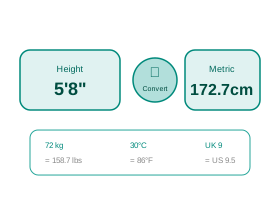
Conversion Formula
Real-Life Guide to Using the Unit Converter
Length, mass, temp, speed, area. Use the examples and checks below to turn the number into a practical decision.
When this calculator is useful
Reach for this when a recipe, product spec, or import invoice lists measurements in a unit you don't think in — say a US recipe in cups and ounces, or a machine part spec in inches — and you need it in metric (or vice versa) before you can actually use it.
For most people, the best way to use the Unit Converter is to try the real case first, then change one input at a time. That makes the trade-off visible. For example, with a loan calculator you can change tenure while keeping the same rate; with an investment calculator you can change return assumption while keeping the same monthly contribution; with a health, education or measurement calculator you can check how much one input changes the final category.
The result should answer a practical question: Can I afford this? How much should I save? Is this score enough? Is this measurement within range? What is the safer or cheaper option? If the output does not answer the decision clearly, adjust the inputs until the scenario matches your real situation.
Practical Advice
Use the Unit Converter as a planning tool, not just a number generator. Write down the inputs you used, because the final answer is meaningful only when you remember the assumptions behind it.
If the decision affects money, health, tax, safety, academics or legal compliance, keep a second check ready. That second check may be a bank quote, payslip, official rule, prescription, site measurement, mark sheet or invoice.
Common Mistakes
- Rounding mid-calculation — converting 5.5 inches to 13.97 cm, rounding to 14 cm, then using that 14 cm for a further conversion instead of the original precise value, which compounds error.
- Confusing mass and weight units — treating 1 kg and 1 kgf (kilogram-force) as interchangeable when doing engineering or force calculations, when only mass converts directly.
- Mixing up US and UK definitions of the same word — a US gallon (3.785 L) is not a UK/imperial gallon (4.546 L), a roughly 20% difference that trips up people converting fuel efficiency figures.
- Applying a linear conversion formula to temperature — trying to convert a 10°C temperature *difference* to Fahrenheit by multiplying by 1.8 and adding 32 (that +32 only applies to absolute readings, not deltas).
- Forgetting that area and volume don't scale linearly — assuming doubling a length unit doubles the area, when 1 square metre is not 2× a half-square-metre-equivalent length conversion; area scales by the square and volume by the cube of the linear factor.
How to Interpret Results
The converted figure is only as precise as the input you typed, so if your source number was itself rounded (e.g. "about 6 feet"), don't treat the output's extra decimal places as exact; carry 2-3 significant figures for everyday use and more only for technical work.
A good interpretation looks at both the main result and the supporting values. If a page shows totals, ratios, categories, schedules or warnings, read those together instead of focusing only on the biggest number.
Unit Converter FAQs
Useful answers for interpreting the output, avoiding mistakes and using the result responsibly.
What is a Unit Converter?
A unit converter translates values between different measurement systems — from metric to imperial and vice versa. It covers all everyday measurement categories: length (km to miles), weight (kg to lbs), temperature (�C to �F), area, volume, speed, data storage, pressure, and energy.
Unit conversion is essential for international travel, scientific calculations, engineering, cooking recipes, and understanding foreign product specifications. All conversions use precise mathematical formulas to ensure accuracy across all supported units.
help_outlineHow to Use the Unit Converter
- Select the Category — choose from Length, Weight, Temperature, Area, Volume, Speed, Time, Data Storage, Pressure, or Energy.
- Enter the Value to Convert — type the number you want to convert; decimals are supported for precise measurements.
- Select the From Unit — the unit your value is currently expressed in (e.g., kilometres, Celsius, kilograms).
- Select the To Unit — the unit you want to convert to; use Swap Units to instantly reverse the direction without re-entering data.
- Click "Convert" — the result appears with the formula used; the Quick Reference table shows common conversions in that category for context.
Benefits
- Covers 10 categories and 100+ units in a single tool — no need for separate length, weight, or temperature converters
- Displays the conversion formula used — learn the relationship while getting your result
- Quick Reference table shows common conversions in the selected category for instant comparison
- Swap Units button reverses conversion instantly — no need to re-enter the value
- Supports precise scientific units (Pascal, Joule, Kelvin) alongside everyday units (kg, km, �C)
Key Terms
- SI (Metric) System
- Globally adopted system — metre, kilogram, second, kelvin as base units; used in science, medicine, and most countries including India
- Imperial System
- Inch, foot, mile, pound, Fahrenheit — used primarily in the USA; also historically used in India for land (feet, acres) and body weight (pounds)
- Conversion Factor
- The number a value must be multiplied by to convert between two units (e.g., 1 km — 0.621371 = miles)
- Absolute Temperature (Kelvin)
- Scale starting from absolute zero (0 K = -273.15�C); used in thermodynamics and gas law calculations — no negative values possible
- Binary vs SI Data Units
- 1 KB (SI) = 1,000 bytes; 1 KiB (binary) = 1,024 bytes — OS storage displays differ from manufacturer labels because of this distinction